
Summary: Learn how to add the Core blockchain to MetaMask in minutes to access Bitcoin DeFi applications. This guide covers manual setup, automatic addition, bridging assets, and exploring Core's BTCfi ecosystem.
Install MetaMask - Ensure you have MetaMask wallet ready
Add Network Details - Input Core's RPC settings manually or automatically
Bridge Assets - Transfer tokens to start using Core dapps
Explore BTCfi - Access lending, trading, and staking applications
Troubleshoot Issues - Solve common setup problems
The Core blockchain is the leading Bitcoin DeFi platform, but to access its ecosystem of applications, you'll need to add Core to your MetaMask wallet. This comprehensive guide walks you through the entire process, from initial setup to exploring BTCfi dapps.
Prerequisites: What You Need Before Adding Core to MetaMask
Before getting started, ensure you have:
A MetaMask wallet installed on your browser or mobile device (Download MetaMask)
A secure backup of your wallet's seed phrase before making any changes
Internet access and a small amount of CORE (optional) to start interacting with the network
Step 1: Open MetaMask and Navigate to Network Settings
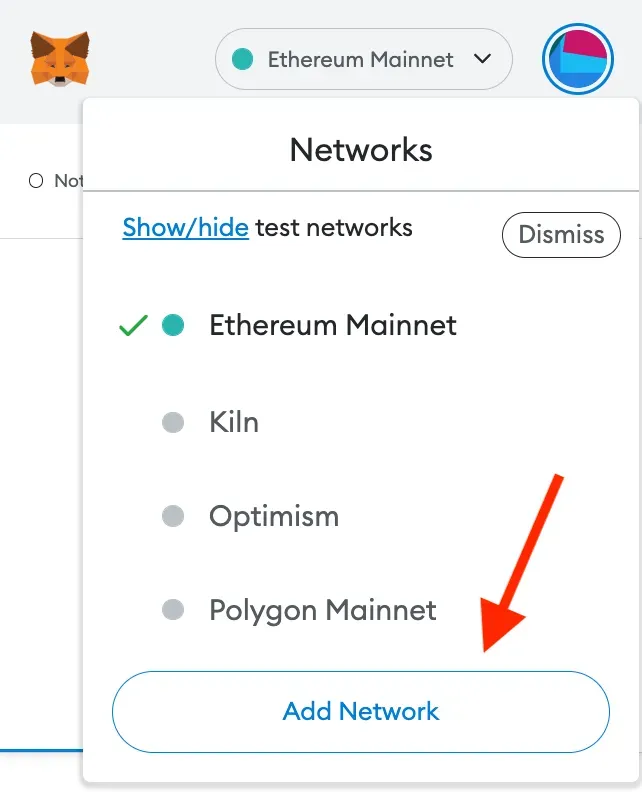
Adding Core to Metamask.webp
Click on the MetaMask extension or open the MetaMask mobile app
In the top-right corner, click the network dropdown (default is "Ethereum Mainnet")
Select "Add Network" to begin adding Core manually
Step 2: Enter Core's Network Details
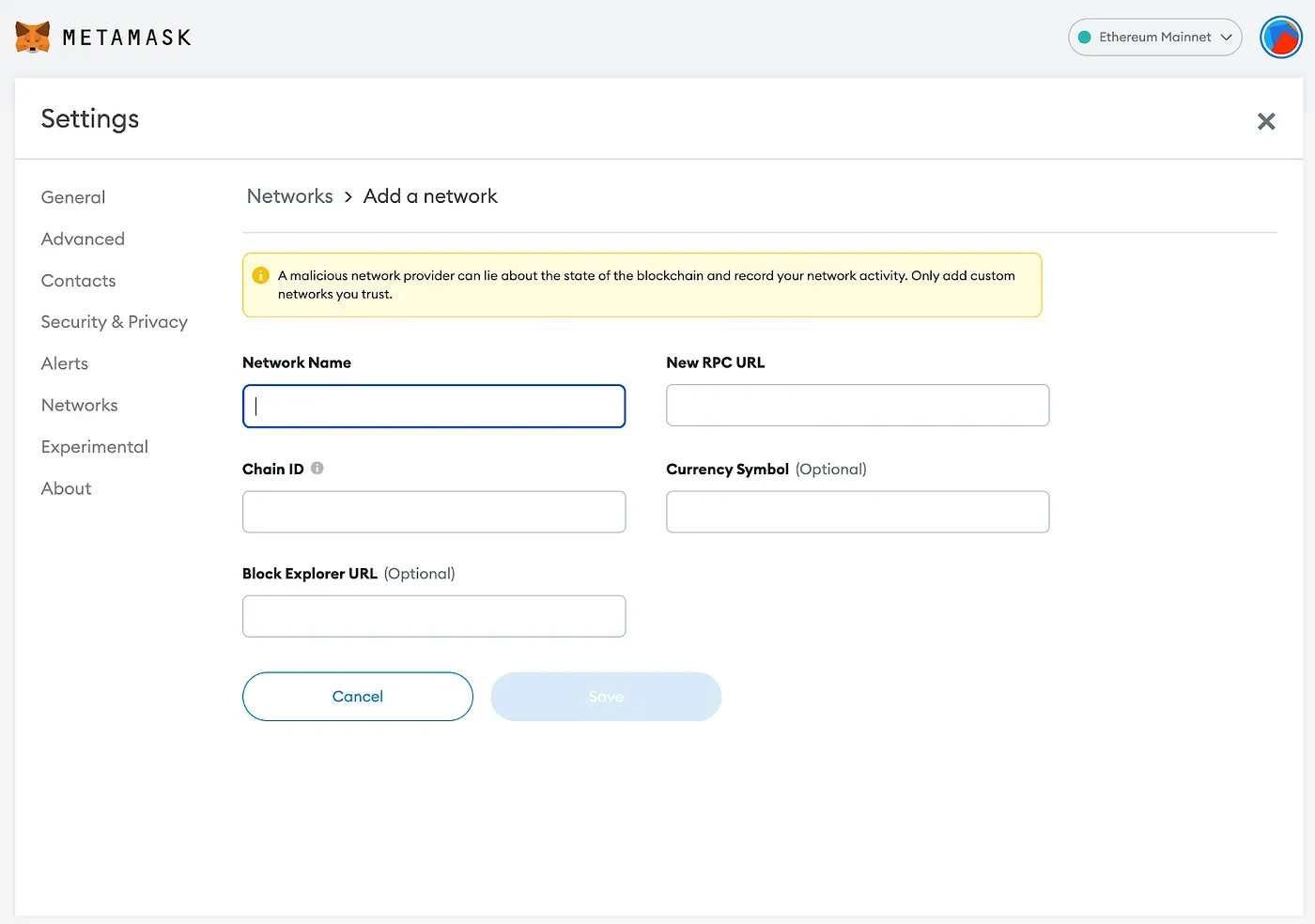
Adding the Core Network
In the "Add a network" section, select "Add a network manually"
Input the following Core network details:
Network Name: Core Blockchain Mainnet
RPC URL: https://rpc.ankr.com/core
Chain ID: 1116
Currency Symbol: CORE
Block Explorer URL: https://scan.coredao.org
Click "Save" and confirm that Core Blockchain Mainnet appears in your list of networks
Step 3: Confirm Core Is Added to MetaMask
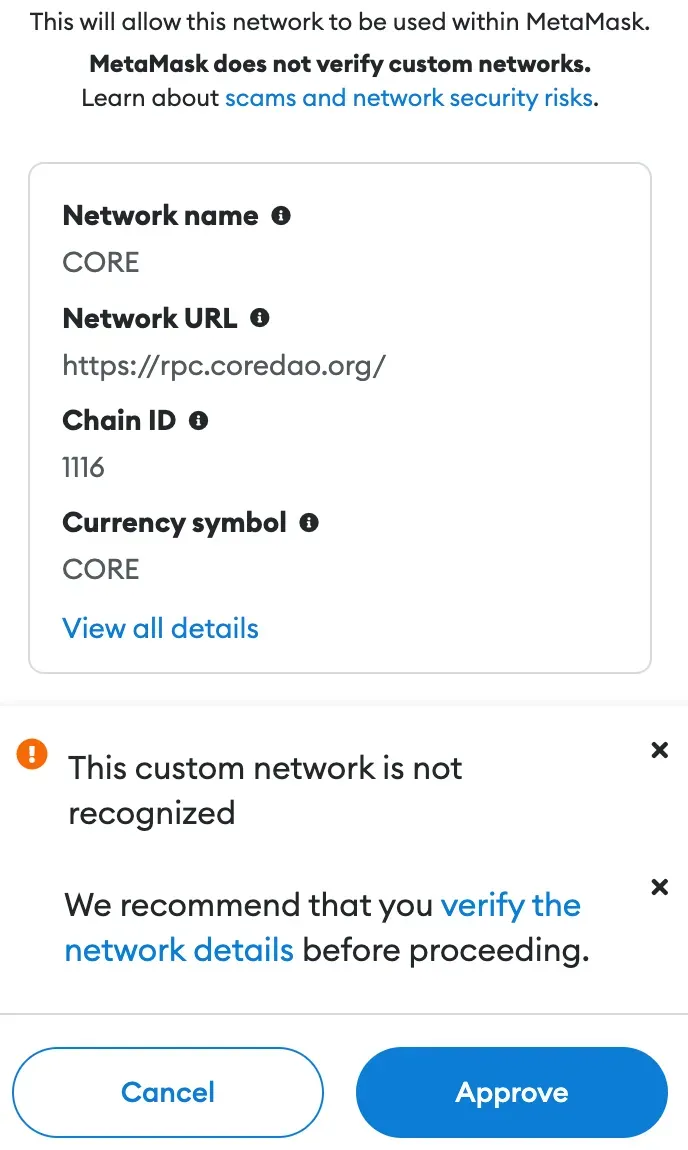
Core Network to Metamask confirm
After saving, navigate back to your MetaMask homepage
Ensure Core Blockchain Mainnet is selected in the network dropdown
You should now see CORE as the currency in your wallet
Step 4: Bridge Assets to Core (Optional but Recommended)
If you want to interact with Core dapps, you'll need CORE or other tokens on the Core network
Use the Core Bridge to transfer assets from Ethereum, BNB Chain, or other supported blockchains
Follow these steps:
Connect your wallet to the bridge
Select the network you're transferring from and to (e.g., Ethereum → Core)
Choose the token and amount to bridge, then confirm the transaction
Step 5: Explore Core's Ecosystem
Now that Core is added to MetaMask, you can explore BTCfi applications:
Lending Platforms – Earn yield on Bitcoin and stablecoins
DEXs and Trading – Swap Bitcoin-pegged assets with minimal slippage
Staking – Participate in CORE token staking to earn yield
Asset Management – Access automated vault systems and portfolio tools
Visit Core Scan to track transactions and wallet activity.
Alternative Method: Add Core to MetaMask Automatically
If you prefer not to add the Core network manually, you can do it automatically in just a few clicks:
Visit coredao.org
Scroll to the bottom of the page
Click the "Add Core Network" button with the MetaMask logo on the bottom left of the site
This will prompt MetaMask to add the Core network automatically—no manual input required.
Troubleshooting: Common Issues and Solutions
MetaMask isn't saving the Core network. What should I do?
Try refreshing your browser or restarting the MetaMask extension.
I bridged assets, but they aren’t showing up. What’s wrong?
Check the transaction status on Core Scan and allow some time for processing.
I entered the wrong Chain ID. How do I fix it?
Remove the Core network from MetaMask and re-add it using the correct details.
Final Thoughts: Why Adding Core to MetaMask Matters
Now that Core is live in your MetaMask wallet, you’re ready to explore Bitcoin’s next frontier.
Frequently Asked Questions
Q: What is the Core blockchain, and why should I add it to MetaMask?
A: The Core blockchain is the leading Bitcoin DeFi platform that combines Bitcoin security with EVM compatibility. Adding it to MetaMask gives you access to BTCfi applications like lending, trading, and Bitcoin staking while enjoying faster transactions and lower fees than Ethereum.
Q: Is Core compatible with Ethereum-based tools like MetaMask?
A: Yes, the Core blockchain is fully EVM-compatible, meaning it works seamlessly with MetaMask and other Ethereum tools. Any dapp that works on Ethereum can potentially run on Core, but with Bitcoin-focused features and infrastructure.
Q: What can I do after connecting Core to MetaMask?
A: Once connected, you can access the entire BTCfi ecosystem including lending platforms for earning yield on Bitcoin and stablecoins, DEXs for trading Bitcoin-pegged assets, Self-Custodial Bitcoin Staking, and various asset management tools—all with low fees and fast transactions.
Q: Is it safe to add Core to MetaMask and bridge assets?
A: Yes. Using audited and tested infrastructure is the best way to securely interact with the Core ecosystem. Always double-check URLs and confirm network details to ensure security during the setup process.
Want to dive deeper into BTCfi?
Explore tutorials, updates, and deep dives on Core’s blog and Core Academy — the easiest way to learn about Bitcoin DeFi.
🔗 Core Website | Twitter | Telegram | Discord | YouTube | LinkedIn | Newsletter